CCA-F Domain 3: Claude Code Configuration and Workflows - Key Concepts

As we discussed in the previous post on Domain 2: Tool Design and MCP Integration, this part of the post will cover the Domain 3 which holds 20% weightage in the exam.
If you have directly stumbled upon this page, I am preparing for the Claude Certified Architect — Foundations (CCA-F), and placing all types of practice questions that I encounter. This may help others, but objective is to keep track of key concept and some practice question that define the topics as well.
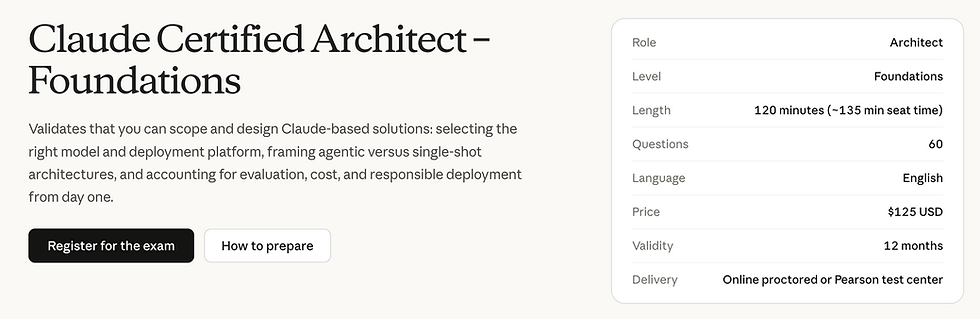
Where to Register: https://anthropic-partners.skilljar.com/claude-certified-architect-foundations-certification
Unofficial practice set, written to match publicly reported blueprint topics — not sourced from the real exam bank. Use for concept drilling, not as a guarantee of exam content.
Topics Covered
CLAUDE.md Hierarchy, Scoping & Modularity
Custom Slash Commands
Claude Skills
Path-Specific Rules (conditional loading)
Plan Mode vs Direct Execution
Iterative Refinement
CI/CD Pipeline Integration (non-interactive mode)
Team Project Setup / Shared Configuration
CLAUDE.md Hierarchy, Scoping & Modularity
CLAUDE.md is a memory file Claude Code automatically reads for persistent project context (coding standards, architecture notes, commands to run). It exists at multiple scopes:
User-level (~/.claude/CLAUDE.md) — personal preferences, applies across all your projects, not shared with the team
Project-level (.claude/CLAUDE.md or root CLAUDE.md, checked into git) — shared with the whole team via version control Files can also be modular — split into smaller imported files instead of one giant file, so only relevant sections load.
Q1. A team complains that a coding-standards rule works on the lead engineer's machine but not for the rest of the team, even though everyone pulled the latest repo. What's the most likely cause?
A) Claude Code is broken
B) The rule was placed in the lead's user-level ~/.claude/CLAUDE.md instead of the project-level, version-controlled CLAUDE.md
C) The team needs a different model
D) CLAUDE.md doesn't support rules
Answer: B — a very commonly tested exam pattern: user-level config isn't shared; project-level config (in the repo) is.
Q2. Why would you split a large CLAUDE.md into multiple smaller, imported files rather than one monolithic file?
A) Claude Code requires it
B) It has no practical benefit
C) Modularity keeps unrelated context out of every session, so only relevant sections load and consume tokens
D) Single files are always better
Answer: C.
Q3. A monorepo has a root CLAUDE.md with general conventions, and a backend/CLAUDE.md with backend-specific rules. What does this demonstrate?
A) Hierarchical scoping — nested CLAUDE.md files let context be specific to the part of the codebase being worked on
B) An error — only one CLAUDE.md is allowed per repo
C) User-level configuration
D) Plan Mode
Answer: A.
Custom Slash Commands
Reusable, saved prompts invoked with /command-name, stored as files (e.g., .claude/commands/review.md), so a team doesn't retype a long instruction ("run our code review checklist") every time. Can accept arguments.
Q4. A team runs the exact same 6-step manual code-review prompt in every PR review session. What's the appropriate fix?
A) Nothing — retype it each time for accuracy
B) Put it in Plan Mode
C) Save it as a custom slash command (e.g., /review) so it's invoked consistently with one command
D) Convert it into an MCP server
Answer: C.
Q5. What's the main functional difference between a simple custom slash command and a Claude Skill?
A) There is no difference
B) Skills support additional capabilities — bundled supporting files, automatic invocation by Claude without the user typing the command, and more complex execution — while custom commands are simpler saved prompts
C) Slash commands can only run once
D) Skills cannot take arguments
Answer: B.
3. Claude Skills
An evolution of custom commands — a packaged capability that can include instructions plus supporting files (scripts, templates, reference docs), and critically, can be invoked automatically by Claude when it judges the skill is relevant, not only when a user explicitly types a slash command.
Q6. A team wants Claude to automatically apply their PDF-generation logic whenever a user asks for "a report," without the user needing to remember a specific command. What fits best?
A) A user-level CLAUDE.md note
B) A Claude Skill, since it supports automatic invocation based on relevance, unlike a plain slash command that requires explicit typing
C) Plan Mode
D) A path-specific rule
Answer: B.
Q7. True/False: Claude Skills can bundle supporting files (e.g., templates or scripts) alongside instructions, while a basic custom command is just saved prompt text.
Answer: True.
4. Path-Specific Rules (Conditional Loading)
Rules or context that only load/apply when Claude is working within a specific directory/path (e.g., a rule that only applies inside frontend/), rather than being loaded globally for the whole project. Keeps irrelevant context out of sessions working elsewhere in the repo.
Q8. A monorepo has both a Java backend and a React frontend. Frontend-specific linting conventions keep getting suggested during backend work, cluttering responses. What's the fix?
A) Delete the frontend conventions entirely
B) Scope the frontend conventions as a path-specific rule tied to the frontend/ directory, so they only load when Claude is working there
C) Merge everything into one CLAUDE.md with no structure
D) Switch to user-level config
Answer: B.
Q9. What's the main benefit of path-specific rules over one global CLAUDE.md?
A) They reduce cost/noise by only injecting relevant context for the area of the codebase actually being touched
B) They replace the need for CLAUDE.md entirely
C) They only work with MCP servers
D) They apply globally regardless of path, ignoring the name
Answer: A.
5. Plan Mode vs Direct Execution
Plan Mode restricts Claude to read-only actions (reading files, searching, analyzing) to build an implementation plan before any changes are made — no file edits, no commits, no state changes. Once approved, execution happens separately.
Direct execution skips this — Claude reads and acts in the same flow. Plan Mode is for higher-stakes/larger changes where you want a review checkpoint; direct execution suits small, low-risk tasks.
Q10. A developer asks Claude to refactor a critical payment module touching 15 files. What's the recommended approach?
A) Direct execution immediately, no review
B) Plan Mode first — let Claude research and propose a plan, review/approve it, then execute — since this is a large, higher-risk change
C) Skip planning since Claude Code doesn't support it
D) Use a slash command instead
Answer: B.
Q11. While in Plan Mode, can Claude modify a file to test a hypothesis?
A) Yes, freely
B) No
C) Only with sudo
D) Only for non-code files
Answer: B — Plan Mode is restricted to read-only actions (reading, searching, analyzing); it cannot create, modify, or delete files, or run state-changing commands
Q12. For a one-line typo fix in a README, is Plan Mode necessary?
A) Yes, always required
B) Plan Mode is required for any file edit
C) Plan Mode and direct execution are the same thing
D) No, direct execution is required
Answer: D — direct execution is appropriate for small, low-risk, unambiguous changes; Plan Mode overhead isn't justified here
Q13. What's the recommended pattern for a mid-to-large feature: Plan → immediate execution, or Plan → written spec file → review → execute?
A) Plan → immediate execution is always better
B) Plan → spec file → review/iterate → execute
C) Neither — always skip planning
D) Spec files are not supported
Answer: B — mirrors how senior engineers work: plan and get the design reviewed before writing code. Committing the spec gives a reviewable, version-controlled artifact before code changes happen
6. Iterative Refinement
Treating Claude Code's output as a first draft to be reviewed and refined across multiple passes, rather than expecting a single perfect result — e.g., generate, review, give targeted feedback, regenerate, until it meets the bar.
Q14. Claude Code generates a first implementation that mostly works but misses two edge cases. What's the appropriate next step?
A) Give targeted, specific feedback on the two missing edge cases and let Claude refine the existing implementation
B) Discard everything and start over with a longer prompt
C) Accept it as-is since first drafts are always final
D) Switch to a different tool
Answer: A — iterative refinement over one-shot perfection.
Q15. Why is iterative refinement often more reliable than trying to write one giant, perfectly detailed prompt upfront?
A) It isn't — one-shot prompting is always superior
B) Claude Code doesn't support multi-turn conversations
C) Complex tasks often have details that only surface once you see a first attempt; refining against real output catches issues a spec alone might miss
D) It uses fewer tokens overall in every case
Answer: C.
7. CI/CD Pipeline Integration (Non-Interactive Mode)
Running Claude Code non-interactively inside automated pipelines (e.g., via the -p / print flag) — no back-and-forth chat, just a prompt in, structured result out, suitable for CI steps like automated PR review or test generation.
Q16. A team wants Claude Code to automatically review every pull request as a CI step and post structured comments, with no human sitting at a terminal. What execution mode fits?
A) Interactive Plan Mode session
B) Non-interactive mode (e.g., -p flag) invoked as a pipeline step, producing structured output the pipeline can parse
C) A custom slash command run manually
D) User-level CLAUDE.md configuration
Answer: B.
Q17. Why is structured (not free-text) output particularly important when Claude Code runs inside a CI/CD pipeline?
A) It looks nicer
B) Structured output is required for Plan Mode only
C) Downstream pipeline steps need to programmatically parse the result (e.g., pass/fail, list of issues) rather than a human reading prose
D) It has no bearing on CI/CD
Answer: C.
Q18. In a CI/CD context, why is an interactive session (waiting for user approval mid-task) unsuitable?
A) It isn't unsuitable, it's preferred
B) Pipelines run unattended; a step waiting on human input would hang/block the pipeline, so non-interactive/no-prompt execution is required
C) CI/CD doesn't support Claude Code at all
D) Interactive mode is faster in CI
Answer: B.
8. Team Project Setup / Shared Configuration
Structuring a project so that Claude Code behaves consistently across every team member's machine — shared, version-controlled CLAUDE.md, commands, skills, and MCP config at the project level, vs. individual/personal preferences kept at the user level.
Q19. A new engineer joins the team and clones the repo. Without any manual setup on their
part, they should immediately get the team's coding standards, custom commands, and project MCP servers. What must be true of the project's configuration?
A) It's all stored in each individual's user-level config, so nothing to do
B) Team configuration is not possible in Claude Code
C) The relevant CLAUDE.md, .claude/commands/, skills, and .mcp.json are project-scoped and checked into the repository, so cloning the repo brings them along automatically
D) Each engineer must manually retype all standards
Answer: C.
Q20. What's a good reason to keep some configuration (e.g., a personal Slack MCP server, individual editor preferences) at the user level instead of project level?
A) User-level config is always required
B) It's specific to one person's workflow/tools and shouldn't be forced on the whole team via the shared repo config
C) Project-level configuration doesn't support personalization at all
D) There's no valid reason; everything should be project-level
Answer: B.
Realistic Scenario-Based Question (cross-topic, exam style)
Q21. A team's PR-review command works differently depending on which engineer runs it, despite everyone using the same slash command file from the repo. Investigation shows some engineers also have a personal ~/.claude/CLAUDE.md with conflicting review conventions. What's happening, and what's the fix?
A) Slash commands are broken; nothing to do with CLAUDE.md
B) User-level CLAUDE.md content is layering on top of project-level context, causing inconsistent behavior; align personal configs or move the conflicting rule to project level so it's authoritative for everyone
C) This is expected and not fixable
D) Restart Claude Code
Answer: B — hierarchy/scoping conflict, a realistic diagnostic-style question.
Q22. For a large feature spanning both backend and frontend, an architect wants:
(1) no code changes until a plan is reviewed,
(2) the plan captured as a reviewable artifact,
(3) backend and frontend conventions to apply only in their respective directories during execution.
Which combination of Domain 3 features satisfies all three requirements?
A) Direct execution + a single global CLAUDE.md
B) CI/CD non-interactive mode only
C) Claude Skills alone, with no Plan Mode
D) Plan Mode → written spec file → review → execute, combined with path-specific rules for backend/ and frontend/
Answer: D.
Q23. A CI pipeline step runs Claude Code non-interactively to auto-generate release notes from commit history, but the step keeps failing because Claude sometimes returns explanatory prose mixed with the release notes, which breaks the parser. What's the root cause and fix?
A) Missing structured output enforcement
B) Non-interactive mode isn't supported for this use case
C) The fix is to switch to Plan Mode
D) The fix is to make the CLAUDE.md file larger
Answer: B — the prompt/config should require a strict output format so the pipeline can reliably parse it, consistent with CI/CD needing structured, parseable results
Q24. A monorepo team wants a skill that automatically kicks in whenever someone asks for "test coverage" analysis, without needing to remember a slash command name, and it needs to reference a bundled coverage-threshold config file. What Domain 3 feature is purpose-built for this, and why not a plain slash command?
A) Plain slash command — identical capability
B) A Claude Skill — it supports automatic invocation based on relevance and can bundle supporting files, which a basic slash command cannot do
C) Path-specific rule — unrelated to this use case
D) User-level CLAUDE.md
Answer: B.
QUICK REFERENCE TABLE
Concept | One-line definition |
CLAUDE.md | Persistent memory file Claude Code reads automatically for project context |
User-level config | ~/.claude/ — personal, not shared with team |
Project-level config | .claude/ in repo — shared via version control |
Modular CLAUDE.md | Split into smaller imported files to reduce irrelevant context |
Custom slash command | Saved, reusable prompt invoked via /name |
Claude Skill | Packaged capability: instructions + files + can auto-invoke |
Path-specific rule | Context that only loads for a specific directory |
Plan Mode | Read-only research/planning phase before any changes |
Direct execution | Read + act in the same flow, no planning checkpoint |
Iterative refinement | Treating output as a draft to review and improve across passes |
Non-interactive mode (-p) | Runs Claude Code unattended for CI/CD, no chat back-and-forth |
Team project setup | Project-scoped, version-controlled shared configuration |
Note: Domain 3 questions on the real exam tend to be diagnostic ("why isn't X working across the team?") rather than pure definition recall.
Referring to these questions just gives you an idea how the exam looks like, and can vary. Share if you have any answers or questions not correctly placed or explained.

Comments